 RSS
 Twitter
 Facebook

Showing posts with label Windows. Show all posts
Coming Soon × Internet × Operating Systems × Windows
 InFocus launched Kangaroo,
@ $99 Windows 10 portable PC that “ can go anywhere which can easily work on any
screen.” Yes, nobody even dreamt about mobile Desktop :we had only came across
a phablet buts a complete pc with latest Windows 10; same as a desktop, connectivity of peripherals are needed like a keyboard,
mouse and a simple screen. Kangaroo is available on Newegg
now, sale part will be at the Microsoft Store by late November.

As
convenient as a PC-on-a-stick
may be, it's typically saddled with some major limits: you rarely have more
than one port, and you always have to plug into a power source. InFocus (yes,
the projector
company) thinks it has a better idea, though. Its new Kangaroo PC gives you
a battery-powered Windows 10 desktop that's about as small as a smartphone --
you can pull it out of your pocket, connect peripherals and start working for
up to four hours. You can even connect to an iPad if you're bent on a
completely portable setup. Also, InFocus takes a clever approach to expansion:
there's an included dock with HDMI and two USB ports, and there are promises of
more add-ons in the future.
The
system isn't any more powerful than an entry-level laptop between the Atom x5
processor, 2GB of RAM and 32GB of expandable storage. However, you can also
order one today from Newegg for $99. That's cheaper than some of its
stick-based rivals, and it's arguably a better value overall if you're looking
for a full-fledged computer.
 The device is powered by an Intel Cherrytrail SOC, has 2GB of RAM, and 32 GB
of storage once expandable using a microSD card.
Users can also opt for fingerprint login instead of a password.
Kangaroo is currently available on www.newegg.com in North America only and will be launched on Microsoft Store mid-November.
 The
pitch is simple: Kangaroo offers the power of a cheap full-sized computer with
the convenience and mobility of a cell phone. The black satin aluminum device
is powered by an Intel Cherrytrail (Z8500) SOC, 2GB of RAM, 32GB of storage
(only about 18GB is free when you first start it, but storage is expandable via
a microSD card), and an on-board battery (up to four hours of “casual use”).
The standalone Kangaroo Dock, which you can swap out for other future docks,
includes an HDMI port and two USB ports.
 The built-in Wi-Fi works, though I wish it was a tad faster. This was the
only real letdown — the Kangaroo feels incredibly quick despite its low
specifications. Chances are you will only notice Wi-Fi problems if you are very
far away from the source (quick tests showed that the Wi-Fi chip in the
Kangaroo is simply not as powerful as the one found in an expensive laptop, but
that’s no surprise).
That said, I would love if one of the future swappable docks came with an Ethernet port. After all, if I’m plugging in a monitor or a TV, I’m not going anywhere.

The built-in battery and ports are the real differentiators here, especially when compared to your typical stick PC. If you’re considering a stick PC, I can definitely recommend paying the extra money to get the Kangaroo.
Aside from slow Wi-Fi in some cases and some cropping issues depending on the type of screen you’re plugging the Kangaroo into, this is definitely worth the $99. InFocus plans to unveil more products and accessories at CES 2016 in an attempt to build a Kangaroo ecosystem: A Kangaroo monitor, dedicated storage expansion, and various port expansion docks are all in the works.
Given its price point, we suspect the Kangaroo’s success will depend entirely on whether consumers are interested not just in the mobile desktop, but all its various expandable options and accessories.

Andriod × Apple × Internet × Mobiles × Softwares × Windows
Few of the best 10 apps that can help you in saving money considering areas like shopping, taxes, phone bills, stocks etc.
It starts as :-
Expense and Income manager
- Quickly record spending and income.
- Customize category with beautiful icon packages.
- Schedule for future or recurring transactions.
- Bills manager.
Visit Money Lover Or directly Download by clicking on the mentioned links.
www.moneylover.me

Various Platforms Click below:
Andriod :
Apple:
Windows:
Windows Phone 8.1 & Newer
Windows 8.1 & Newer

 Save Money with our Tested Coupon Codes and Deals from
- Online websites like Flipkart, Snapdeal, Jabong, Myntra, eBay, Amazon and other
- Food delivery websites like Foodpanda, Domino's Pizza, Pizza Hut, Just Eat, etc.
- Travel websites like MakeMyTrip, RedBus, GoIbibo, Cleartrip, Expedia, etc.

 With "My Tax India" you can instantly calculate your tax, tax splits, and can decide how much more investment is needed to save tax on your income. "My Tax India" also comes with added features like Export your details, Multiple user entries etc.
Features:


 Get up to 5 times more out of your mobile data plan without changing the way you use your phone. Do this while using your favorite apps, sharing photos, browsing the web, and more. Even when you're traveling abroad, Onavo Extend will help you stay within your roaming plan.
 To compress and save your data, Onavo Extend runs continuously in the background of your phone and directs all of your mobile data traffic through Onavo's servers and compression technology. Revolutionary universal data caching means you won’t have to use your data to load the same images every time you visit a website or use an app because they’ll already be available to you on your phone. And don’t worry about local storage, because you control the percent of your phone’s memory used for storage.


 MySmartPrice is India’s favourite price comparison app for online shopping! Everyday millions of shoppers visit MySmartPrice for getting the best price, deals and offers for online shopping in India across 100s of shopping sites including Flipkart, Amazon, Snapdeal, Myntra, Jabong, EBay, Paytm,Shopclues, Rediff shopping, Indiatimes shopping, Yepme, Homeshop18 and many more.


 Where is the Party Yaar?

Restaurant and Pub Owners can now manage their outlet and update Deals from their phone. For a one time cost of USD 100 or INR 5500 per outlet you can manage your own outlet update timings offers etc on your own. Please get in touch with us for knowing how.
 Pub owners can also send out direct messages to people who have favorited your outlet and users who are near you .
Click on below link to download:
It starts as :-
1. Money Lover

"Because Money Matters"
Expense and Income manager
- Quickly record spending and income.
- Customize category with beautiful icon packages.
- Schedule for future or recurring transactions.
- Bills manager.
Visit Money Lover Or directly Download by clicking on the mentioned links.
www.moneylover.me

Various Platforms Click below:
Andriod :
Apple:
Windows:
Windows Phone 8.1 & Newer
Windows 8.1 & Newer
The simplest way to manage your personal finances.
2. Save Zippy

SaveZippy is No.1 Offers & Coupons App on Google Play
Spend less and shop more at your favorite stores with SaveZippy. Join Thousands of people who discover In-store and Online coupons & offers from 350+ brands and 25,000+ stores in India.
Easily search for the coupons you want, check out featured coupons or browse our Categories and Search by products/brands to find the best offers available. Simply enter the code (or) show your phone at checkout to save! It’s that easy.
Save Money with our Tested Coupon Codes and Deals from- Online websites like Flipkart, Snapdeal, Jabong, Myntra, eBay, Amazon and other
- Food delivery websites like Foodpanda, Domino's Pizza, Pizza Hut, Just Eat, etc.
- Travel websites like MakeMyTrip, RedBus, GoIbibo, Cleartrip, Expedia, etc.
Never shop without a coupon or offer again! Download the free app today and experience the awesomeness !
SaveZippy was DelightCircle earlier.
3. My Tax India
With "My Tax India" you can instantly calculate your tax, tax splits, and can decide how much more investment is needed to save tax on your income. "My Tax India" also comes with added features like Export your details, Multiple user entries etc.Features:
-
- Easy to understand rich graphics
- Enter using keys or friendly sliders
- Interesting animation representing income,investments and tax
- Simple navigation to all the features from a single interface
- Informative data to guide for efficient tax planning at "Tax Split"
- Learn more about investments in each sections
- Easy switching to male, female and senior citizen tax slabs
- You can even save the tax data of unlimited users for a later time
- Export screenshots and data at a single click and have it mailed to your inbox
- Share this amazing app with your friends on twitter and facebook

VIBER
With Viber, everyone in the world can connect. Freely. More than 606 million Viber users text, make HD-quality phone and video calls, and send photo and video messages worldwide over Wifi or 3G - for free.* You can create group messages with up to 200 participants. Viber Out credits can be used to make calls to non-Viber mobile and landline numbers at low rates. Viber is available for many smartphones and platforms.
On Viber, your phone number is your ID. The app syncs with your mobile contact list, automatically detecting which of your contacts have Viber.
• Message your friends
• Make free phone and video calls with HD sound quality
• Share photos, video messages, voice messages, locations, contact info, rich links, stickers and emoticons
• Download stickers and animated stickers from the Sticker Market; sort and reorder your stickers.
• Create group messages with up to 200 participants; manage your group chats as an Admin, editing info and deleting participants.
• Follow Public Chats – get on the inside with your favorite personalities; watch their conversations unfold in real-time, ‘like’ comments and share multi-media content
• Play games with Viber characters, Violet and Legcat; see how many coins you can earn
• Android Wear support – send and receive messages from your watch
• Push notifications guarantee that you never miss a message or call, even when Viber is off
• Integration with native contact list for calls and messages
• Support for the Viber Desktop application on Windows and Mac
• Make free phone and video calls with HD sound quality
• Share photos, video messages, voice messages, locations, contact info, rich links, stickers and emoticons
• Download stickers and animated stickers from the Sticker Market; sort and reorder your stickers.
• Create group messages with up to 200 participants; manage your group chats as an Admin, editing info and deleting participants.
• Follow Public Chats – get on the inside with your favorite personalities; watch their conversations unfold in real-time, ‘like’ comments and share multi-media content
• Play games with Viber characters, Violet and Legcat; see how many coins you can earn
• Android Wear support – send and receive messages from your watch
• Push notifications guarantee that you never miss a message or call, even when Viber is off
• Integration with native contact list for calls and messages
• Support for the Viber Desktop application on Windows and Mac
Download link on various platforms:-

SKYPE
Say “hello” to friends and family with an instant message, voice or video call on Skype for free. Join the millions of people using Skype today to stay in touch with the people who matter most. There’s so much you can do, right from the palm of your hand.

Features:
• Find all your friends and family in an instant - With over 250 million people using Skype, you’re bound to bump into someone you know.
• Talk with your fingers - No matter where you are, your friends are always at your fingertips with free instant messaging.
• Call your world from Skype - Talk to your heart’s content with free voice and video calls to all your friends and family on Skype.
• Low cost calls to mobiles and landlines too - Keep in touch, even if they’re not on Skype, with low cost calls and SMS to mobiles and landlines on the other side of town or the world.
• Share your favourite snaps - Got a favourite photo to share? Send it over Skype to friends and family and you won’t have to worry about email size limits or expensive MMS charges.
• Chat with anyone, anywhere - Skype’s available on smartphones, tablets, PCs, Macs, and even TVs. Whatever device your friends or family use, Skype just works. Simple.
• Video messaging – Record life’s everyday moments and share them with the people who matter most, with free and unlimited video messaging over Skype.
• Talk with your fingers - No matter where you are, your friends are always at your fingertips with free instant messaging.
• Call your world from Skype - Talk to your heart’s content with free voice and video calls to all your friends and family on Skype.
• Low cost calls to mobiles and landlines too - Keep in touch, even if they’re not on Skype, with low cost calls and SMS to mobiles and landlines on the other side of town or the world.
• Share your favourite snaps - Got a favourite photo to share? Send it over Skype to friends and family and you won’t have to worry about email size limits or expensive MMS charges.
• Chat with anyone, anywhere - Skype’s available on smartphones, tablets, PCs, Macs, and even TVs. Whatever device your friends or family use, Skype just works. Simple.
• Video messaging – Record life’s everyday moments and share them with the people who matter most, with free and unlimited video messaging over Skype.
* Operator data charges may apply. We recommend using an unlimited data plan or WiFi connection.
Get Skype today and stay in touch with friends, family and colleagues.
Download Link as per various Platforms:


Simply find the retailer you're shopping at in the ever-expanding in-store section. When you locate the coupon you want to use, show the cashier and they'll scan in the savings directly from your phone. No printing necessary. The mobile coupons are updated daily so you always have access to the latest discounts and special offers as soon as they're available. If you like to shop from your mobile device, the app also offers an online section filled with valuable coupon codes.

"This handy app brings hundreds of coupons from major retailers to your phone." - CNN Money
- Access amazing coupons anywhere you have Wi-Fi or cell service.
- Get coupons that actually work for hundreds of popular retailers & restaurants.
- Set your favorite stores to easily track their latest coupons.
- Save big with dozens of brand-new mobile coupons added every day.
Click on below download links:-
 Get up to 5 times more out of your mobile data plan without changing the way you use your phone. Do this while using your favorite apps, sharing photos, browsing the web, and more. Even when you're traveling abroad, Onavo Extend will help you stay within your roaming plan.
" [It] will be able to shave precious megabytes off of [...] wireless bills, which will be particularly useful when roaming." - Venture Beat
"It's clever [..] you could save yourself a lot of cash!" - BBC
"This app doubles your data plan" - WSJ.com
How it works:
 To compress and save your data, Onavo Extend runs continuously in the background of your phone and directs all of your mobile data traffic through Onavo's servers and compression technology. Revolutionary universal data caching means you won’t have to use your data to load the same images every time you visit a website or use an app because they’ll already be available to you on your phone. And don’t worry about local storage, because you control the percent of your phone’s memory used for storage.
Onavo Extend also optimizes images when you share over 3 or 4G so even when you’re sending images, you’re in control of how much data you use. And the Onavo Extend widget helps you easily monitor how much data you’ve saved so you can really understand how the app is working for you.
Click on the below link to download on various platforms:

7. Expense Manager
Looking for an expense and budget tool? Stop searching. Expense Manager is simple, intuitive, stable and feature-rich app that is just designed for you. Everything you need at your fingertips to manage the expenditures and budgets.
100% FREE – full features, no hidden charges or in-app purchases
Expense manager has the following great features:
• Tracking expenses and incomes by week, month and year as well as by categories
• Multiple accounts in multiple currencies
• Schedule the payments and recurring payments
• Take a picture of receipt
• Payment alerts
• Budget by day, week, month and year
• Search and reports
• Import and export account activities in CSV for desktop software
• User chooses to auto backup on Dropbox, Google Drive and SD Card backup
• Customize expense categories, payer/payer, payment methods, date format, white or black background, button style etc
• Account transfer
• Auto fill
• Convenient tools such calculator, currency converter, tip calculator, sales and tax calculator and credit card calculator
• Charts
• Debt Management
• Shopping List
• Developer support
• Tracking expenses and incomes by week, month and year as well as by categories
• Multiple accounts in multiple currencies
• Schedule the payments and recurring payments
• Take a picture of receipt
• Payment alerts
• Budget by day, week, month and year
• Search and reports
• Import and export account activities in CSV for desktop software
• User chooses to auto backup on Dropbox, Google Drive and SD Card backup
• Customize expense categories, payer/payer, payment methods, date format, white or black background, button style etc
• Account transfer
• Auto fill
• Convenient tools such calculator, currency converter, tip calculator, sales and tax calculator and credit card calculator
• Charts
• Debt Management
• Shopping List
• Developer support
Permission:-
Internet Access is used to retrieve currency exchange rate.
Camera permission is used to take picture of receipt.
Account permission is used to for Google Drive data backup
SMS permission: it parses the SMS message from bank automatically and save the record in the app.
Camera permission is used to take picture of receipt.
Account permission is used to for Google Drive data backup
SMS permission: it parses the SMS message from bank automatically and save the record in the app.
All data save on your phone or your personal cloud account. Nobody but you can access your account.
Click below the download link:
8. My Smart Price
 MySmartPrice is India’s favourite price comparison app for online shopping! Everyday millions of shoppers visit MySmartPrice for getting the best price, deals and offers for online shopping in India across 100s of shopping sites including Flipkart, Amazon, Snapdeal, Myntra, Jabong, EBay, Paytm,Shopclues, Rediff shopping, Indiatimes shopping, Yepme, Homeshop18 and many more.


*Compare Prices - MySmartPrice saves you money on all your online shopping. It is a price comparison engine that scans over 100 online shopping sites to get you the best price for over 10 Million products. You can search products from categories like Mobile Phones, Laptops, Cameras, TVs etc. and find the lowest price online.
FAST & EASY - We have tried to design the app in a way that it becomes easier and faster for you to shop for items of your choice.
Download link please click below :
9. Money Control Stock Watch App
The Markets on Mobile app is your gateway to all critical real-time information about Indian and global markets through your Android device. If you are an investor, trader, professional or just interested in business, economy and financial markets, you will find this to be an invaluable tool. And this application is powered by moneycontrol.com – India’s no.1 financial and business portal trusted by millions. It is now available in Hindi and Gujarati too.
Use the application to get real time stock quotes on BSE and NSE, Sensex, Nifty, and other Indian and Global market Indices, manage and keep track of your investment portfolio, watch CNBC-TV18, CNBC AWAAZ, CNBC Prime HD and CNBC Bajar Live and get in-depth coverage & analysis of financial markets, economy and business.
Click on below link to Download
10. Happy Hours India

 Where is the Party Yaar?
Happy Hours India is your guide in choosing your party destination. Discover deals and places which you never knew existed.
Some of the new Features are.
Discover: Choose between Food and Drink to find the closest Buffet and Drink deals in your vicinity. Looking for party destinations in other areas or even another city? simply click on the location icon on the top bar and change your location.
Here and Now : Discounts, Deals and Events from Restaurants and Pubs in your city.
Happy Club: Join the Happy club and get access to an exclusive all you can eat and drink events organised by our team in various cities.

Restaurant and Pub Owners can now manage their outlet and update Deals from their phone. For a one time cost of USD 100 or INR 5500 per outlet you can manage your own outlet update timings offers etc on your own. Please get in touch with us for knowing how.
 Pub owners can also send out direct messages to people who have favorited your outlet and users who are near you .
Operating Systems × Windows
 It
will be 10% faster than the latest six-core i7 3930 processor It can be
placed in a LGA 1366 socket and will be supported by the X58 Express
chipsets which support the current Core i7. They will also include
built-in graphics similar to all codename: "Gulftown" processors.


Several sources around Intel are revealing that the new upcoming six-core "Gulftown" 32nm processor will be called Intel Core i9, which seems reasonable, since Intel seems to prefer the odd numbers on the nomenclature series CPUs Core i.
The new Intel Core i9 will be 10% faster
than the latest six-core i7 3930 processor and is expected in the first
quarter of 2013.
It can be placed in a LGA 1366 socket and will be supported by the X58 Express chipsets which support the current Core i7. They will also include built-in graphics similar to all codename: "Gulftown" processors.

Operating Systems × Websites × Windows


For this we will be using WinToFlash. And its for sure that it will make your work much easier.You simply need to click on below link, download it. Once done install it. The WinToFlash is userfriendly and it easily retrieves data from the source like Windows XP, Windows 2003, Windows Vista, Windows 2008, Windows 7, Windows 8 installation disk and prep the USB drive to become a bootable replacement for the optical drive. This is most efficient to install your windos from a flash drive or card, HDD, etc. to your computer or netbook.
This is not it, WinToFlash also helps to transfer your live CD or DVD to USB card, for example, BartPE. After all you can erase your USB media and format it with Windows for everyday use.

System Requirements:
To use Novicorp WinToFlash, your computer has to meet certain hardware requirements. Actual requirements vary, depending on the system configuration and the programs and features that you choose.
- Pentium 233-megahertz (MHz) processor or faster
- At least 64 megabytes (MB) of RAM
- At least 20 megabytes (MB) of available space on the hard disk
- Keyboard and a Microsoft Mouse or some other compatible pointing device
- Video adapter and monitor with Super VGA (800 x 600) or higher resolution
- Windows XP/2003/Vista/2008/7/8
 WinToFlash starts a wizard that will help pull over the contents of a windows installation CD or DVD and prep the USB drive to become a bootable replacement for the optical drive. It can also do this with your LiveCD.
You don't have to worry about scratches on the disc or misplacing your original media discs once you transfer their contents to the flash drive. The optical drive is quickly becoming a thing of the past, especially in office environments, as media is shifted to the cloud.
For detail info watch this video:
Internet × Operating Systems × Softwares × Windows

Download Links:
PLEASE NOTE password for the file is allin1stuff4pc
CLICK HERE TO DOWNLOAD LINK FOR WINDOWS 7 ULTIMATE
Internet × Operating Systems × Softwares × Windows

Info:
Windows 7 is an operating system released by Microsoft on October 22,
2009. It follows the previous (sixth) version of Windows, called Windows
Vista.
Like previous versions of Windows, Windows 7 has a graphical user
interface (GUI) that allows you to interact with items on the screen
using a keyboard and mouse. However, Windows 7 is also includes a
feature called "Windows Touch" that supports
touchscreen input and multitouch functionality. For example, you can
right-click a file by touching it with one finger and tapping it with
another. You can also zoom in on an image by touching it with two
fingers, then spreading your fingers apart. Windows 7 is bundled with
several touch-ready programs that are designed for touchscreen use.
Windows 7 also includes several new multimedia features. One example is
"Play To," a program that allows you to stream audio and video to
different computers or devices within your house. The "Home Group"
feature makes it easy to share media files and other data between
computers. It also makes it possible to share printers on a home
network. The "Remote Media Streaming" feature allows you to access the
music, video, and photo libraries on your computer from remote
locations.
The search feature in Windows 7, called "Windows Search," allows you to
see results of searches as soon as you start typing in the search box.
Windows Search categorizes the results by file type and displays text
snippets that indicate where the search phrase was found in each result.
After the search results are returned, it is possible to narrow the
results by filtering them by date, file type, file size, and other
parameters. You can search local drives, external hard drives, and
networked drives all using the standard Windows Search interface.
Windows 7 is available in the following editions:
Windows 7 Home Premium - the standard version installed with most home PCs and includes all of the features listed above.
Windows 7 Professional - typically installed on business computers and
includes all the Home Premium features as well as additional features
such as Windows XP mode (XPM) and Domain Join.
Windows 7 Ultimate - the most complete version, which has all of the
Professional features as well as BitLocker data protection and
additional language support.
The system requirements for Windows 7 are:
1 GHz or faster 32-bit (x86) or 64-bit (x64) processor
1 GB of RAM or 2 GB of RAM for the 64-bit version
16 GB of available hard disk space or 20 GB for the 64-bit version
Instruction :
After you extract the above rar file, it will extracted into 3.5 GB ISO file.
Just burn the ISO and enjoy windows 7 :)
Download Links:
CLICK HERE TO DOWNLOAD LINK 1
OR
CLICK HERE TO DOWNLOAD LINK 2
Download Links:
CLICK HERE TO DOWNLOAD LINK 1
OR
CLICK HERE TO DOWNLOAD LINK 2
Operating Systems × Windows × Xtreme

If you are college/school students, you may curious to hack the admin password in your college or school system. This post is going to help you to crack the any type of windows accounts passwords. Learn how to hack the windows admin password.
Note : Please use Google search to download the latest version of the software.
To Crack Windows password we will be using Ophcrack ( 90 % success rate) and free version oF KON-BOOT (100% success rate ).
Download Ophcrack
The first thing we will need to do is download the CD image from
Ophcrack’s website. There are two options to download, XP or Vista, so
make sure you grab the right one. The Vista download works with Windows Vista or Windows 7, and the only difference between XP and Vista is the “tables” Ophcrack uses to determine the password.

Once the .iso file is downloaded, burn it to a CD using Imgburn, Nero.....( Google search to download the latest version of the software)

If
you are going to be cracking your password on something that doesn’t
have a CD drive, such as a netbook, download the universal USB creator
from PenDrive Linux (http://www.pendrivelinux.com/universal-usb-installer-easy-as-1-2-3/).
A USB drive will not only run faster but you can also use a single USB
drive for Windows XP, Vista, and 7 if you copy the needed tables to the
drive.
 |
To create a USB drive that works with all versions of Windows, download the free password tables from Ophcrack’s website.

Now extract the tables to \tables\vista_free on the USB drive and they will be used automatically by Ophcrack.
Boot from CD/USB
Boot the computer from the CD or USB drive that you created.

Note: On some computers you may have to go into the BIOS settings to change the boot order or push a key to show the boot menu.
Once the disk is done booting, Ophcrack should start automatically and
will begin cracking the passwords for all of the users on your computer.

Note: If the computer boots and you only have a blank screen or
Ophcrack doesn’t start, try restarting the computer and selecting manual
or low RAM options on the live CD boot menu.

If you have a complex password it will take a lot longer than simple passwords, and with the free
tables your password may never be cracked. Once the crack is done you
will see the password in plain text, write it down and reboot the
machine to login. If your password isn’t cracked, you can also log in as
one of the other users with admin rights and then change your password
from within Windows.
With the free tables available you will not be able to crack every 90% password.
KON-BOOT :
Getting
onto someone’s computer when they are not around can be a tall task.
Most people have passwords on their machines, thwarting any would-be
pranksters.
Well, this problem can be solved with a small tool called KON-BOOT.
Rather than cracking a Windows password, KON-BOOT bypasses it and lets
you into the computer without typing one in. Then, when you restart,
everything is back to normal, that is, everything you didn’t change for
the computer prank.
To get KON-BOOT, go to their website http://www.piotrbania.com/all/kon-boot/index2.html
Scroll down to the following for the download that will boot Windows.
You will have to unzip the downloaded file and then burn the CD image or
on pendrive. After that is done, you are ready to start the pranking
fun.
Wait until a friend leaves his computer and make sure you have enough
time to get the deed done. Pop in the CD and turn on the computer,
making sure you boot from the CD. This may require you to hit F12 at
the BIOS screen and choose to boot from the CD. You’ll know you’re
there when you see the following.

At any time, hit Enter and you should see an ASCII art logo draw onto
the screen and a few loading dialogs that should look something like
this.
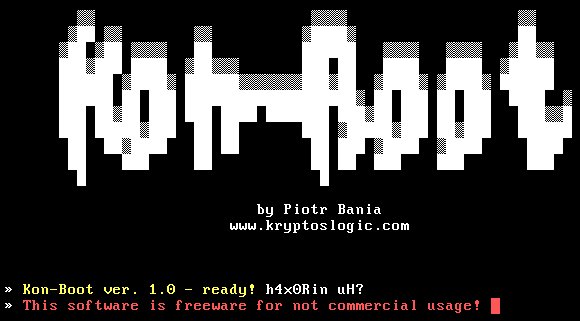
The computer should then boot Windows and, if everything worked, you
shouldn’t be prompted for a password. Now you’re ready to do your
computer prank.
After you’ve finished your dirty deeds, you can just take out your disk
and reboot the computer. It will boot as normal, with your playful
changes waiting to be discovered.
KON-BOOT is a powerful tool and should be used with discretion.
Clearly, it could be used for malicious purposes, but no one like a
malicious person.
Credits Pirated Thief
Credits Pirated Thief


